This is Part 2 of the Solana Program Lifecycle series. In Part 1 we covered how accounts work. Now comes the thing that will break our code if we ignore it: compute units.
Solana transactions don’t warn you when you’re close to the compute limit. They just fail. Users lose the fees. No refund. The first time many developers discover this is when mainnet starts rejecting transactions that worked fine on devnet.
This post is about not learning that the hard way.
The problem: Our transaction costs more than we think
Solana transactions don’t fail gracefully when they run out of compute. They just die. Users lose the fees. No refund. No warning.
The problem: most developers guess at their compute costs instead of measuring them. “Oh, a CPI is probably fine, I can fit 10 of them.” Then profiling reveals that 10 CPIs alone burn significant compute out of the 1.4M budget. Add some signature verification, a few account loads, a bit of deserialization, and suddenly the transaction is over budget.
The second problem: it’s not obvious which parts of the code are expensive until measured. A signature verification is 25,000 CU. A simple arithmetic operation is around 100-150 CU in practice (including serialization overhead). The difference is significant. Without profiling, it’s guesswork.
This post covers how to see actual costs. And once they’re visible, optimization becomes obvious.
What is a compute unit (CU)?
A compute unit is a meter on a transaction. Every operation costs some amount. When we run out, the transaction fails.
The budgets:
| What | Budget | Notes |
|---|---|---|
| Per instruction | 200,000 CU | Default allocation. Some system instructions get less. |
| Per transaction | 1,400,000 CU | Total across all instructions. If our code is cheap, we can request less. |
| Account limit | 32 accounts per transaction (64 with Address Lookup Tables) | Standard transactions are 32. Address Lookup Tables (ALTs) raise this to 64. Each account loaded costs CU based on data size. |
The concept is similar to Ethereum’s transaction fee meter: every operation has a cost. Ethereum provides a cost estimate before submission; Solana does not show that estimate by default, so CU cost must be measured explicitly or risk a silent failure.
Why different operations cost wildly different amounts
Not all code is equal. Some operations are 10 CU. Others are 25,000 CU. The gap is three orders of magnitude. The runtime charges based on how hard each operation actually is.
CU costs below are from the Agave runtime source. These values can change between runtime versions. Always profile with
cargo test-sbffor real numbers from your code.
Cheap (10-100 CU):
- Memory operations (
mem_op_base_cost): 10 CU - Logging (
log_64_units): 100 CU - Sysvar access (
sysvar_base_cost): 100 CU
Medium (85-1,500 CU):
- SHA-256 hashing (
sha256_base_cost): 85 CU base + 1 CU per byte. A 32-byte hash costs ~117 CU. - Program address derivation (
create_program_address_units): 1,500 CU
Expensive (10,000+ CU):
- secp256k1 signature recovery (
secp256k1_recover_cost): 25,000 CU per signature - Borsh deserialization of large structs (varies by size)
- Cross-program invocations (CPI): 946 CU base invocation cost (
invoke_units), plus the invoked program’s full execution cost and account data transfer (cpi_bytes_per_unit= 250 bytes/CU)
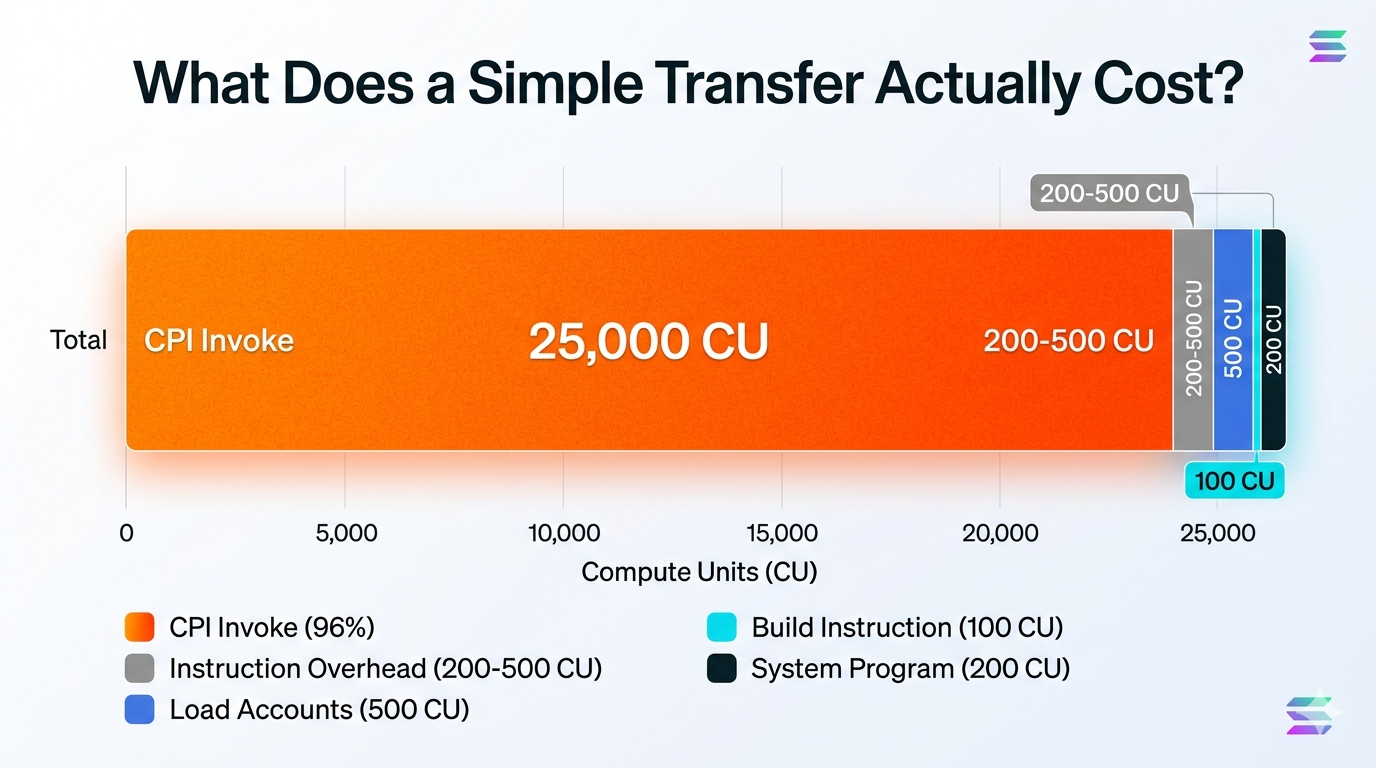
The CPI number surprises people. The base invocation is only 946 CU, but the total cost of a CPI includes everything the called program does. A CPI to the System Program for a transfer might total ~26,000 CU once the program’s own execution is included. A CPI to a complex DeFi program could burn 100,000+ CU. The base cost is small; the callee’s execution dominates.
Example: What a transfer costs
A simple transfer to the System Program:
Instruction overhead:        200-500 CU
Load 3 accounts:             ~500 CU
Build the instruction:       ~100 CU
CPI base invocation:         ~946 CU
System Program processes it: ~200 CU
─────────────────────────────────────
Total:                       ~2,000 CU (base) to ~26,000 CU (with full CPI overhead)
A simple transfer fits comfortably. But add one secp256k1 signature verification (+25,000 CU) and that’s ~27,000 CU total. Add a 10KB Borsh deserialization (~40 CU for data transfer at 250 bytes/CU) and another CPI to a complex program (~50,000+ CU), and suddenly it’s 77,000+ CU. Still under 200K, but the compounding is clear.
Measure it, don’t guess
Before we optimize anything, we need to see the actual numbers. Guessing wastes time.
Using cargo test-sbf
cargo test-sbf (called internally by anchor test) compiles and runs our program against a local BanksClient. When the test runs, the program logs show exactly how many CU were consumed:
| |
The output includes a line per instruction:
Program <id> invoke [1]
Program log: ...
Program <id> consumed 45,231 of 200,000 compute units
Program <id> success
That’s real data from our actual code. We can also use the simulateTransaction RPC method (exposed as solana confirm -v in the CLI) to get a CU estimate for a transaction against a live cluster before we commit to submitting it.
A real Anchor test example:
| |
Run this and watch the output. We’ll see something like:
Program <id> consumed 78,432 of 200,000 compute units
That 78,432 is our actual number. Not a guess, not a calculation. Real measurement.
The optimization patterns (and where they actually help)
Once we can measure, we can optimize. Here are the patterns that actually matter.
Pattern 1: Minimize CPIs (the biggest win)
Each cross-program invoke has a base cost of 946 CU, but the total cost includes everything the invoked program does. A CPI to the Token Program might cost 15,000 CU total. A CPI to a complex program could burn 100,000+ CU. Stack 10 CPIs to various programs and the costs compound fast.
The trap:
The fix: If the target program supports batching, use it. If it doesn’t, move the loop outside the transaction and do multiple transactions instead.
This is the single biggest win. Each unnecessary CPI removes its base invocation cost (946 CU) plus the full execution cost of the callee. Eliminating CPIs is almost always the highest-impact optimization.
Pattern 2: Don’t deserialize what we don’t need
Deserializing a 10KB Borsh struct takes CU. But if we only need bytes 64-72, deserializing the whole thing is wasteful.
| |
This only makes sense if profiling shows deserialization is the bottleneck. Most of the time it isn’t. Use it as a last resort when close to the CU limit and other optimizations don’t help.
Pattern 3: Stop including accounts we don’t use
The account limit is 32 per standard transaction (64 with Address Lookup Tables). Account data transfer costs 1 CU per 250 bytes during CPIs (cpi_bytes_per_unit). If an account isn’t touched, don’t include it.
The waste:
Those 22 unused accounts? Wasted data loading costs. Every byte transferred during CPIs costs CU.
The fix:
Include only what we actually read or write.
Pattern 4: Don’t verify 10 signatures in one instruction
secp256k1 recovery is 25,000 CU per signature (secp256k1_recover_cost). Verify 10 signatures and that’s 250,000 CU just for verification. The budget is almost gone before any actual work happens.
If we need multiple signatures:
- Verify them offchain and only validate the result onchain
- Use a multisig program that batches verification
- Split into multiple transactions
This is a hard limit, not a pattern. If a use case needs 10 signature verifications in one instruction, it’s fighting the architecture, not working with it.
Priority fees: paying to jump the queue
When mainnet is busy, transactions wait. Paying a priority fee cuts in line. The more paid per CU, the higher the priority.
set_compute_unit_pricetakes micro-lamports per compute unit. 1 lamport = 1,000,000 micro-lamports.
| |
When to use it:
- During congestion, if our transaction keeps timing out
- Time-sensitive operations: MEV (reordering trades for profit), liquidations (close risky loans fast), arbitrage (exploit price differences before markets close)
- Load testing mainnet pressure
On devnet/testnet:
| |
The transaction budget: when we need to split
The budget is 1.4M CU total per transaction. If chaining multiple instructions, each one’s cost needs to be known.
Example: Safe transaction
Instruction 1: 45,000 CU
Instruction 2: 60,000 CU
Instruction 3: 35,000 CU
Total: 140,000 CU < 1,400,000 CU ✓
Example: Over budget
Instruction 1: 600,000 CU
Instruction 2: 600,000 CU
Instruction 3: 600,000 CU
Total: 1,800,000 CU > 1,400,000 CU ✗ FAILS
If approaching 1.4M, split into two transactions. Do it during development, not during a production incident.
The checklist before mainnet
This is what separates code that ships from code that fails in production.
- Profile with cargo test-sbf: measure actual CU usage. No guessing.
- Test the hard case: max accounts, max data, everything constrained. What does it cost?
- Estimate priority fees: during peak times, what does 1,000 micro-lamports per CU cost in SOL?
- Plan for splits: if close to 1.4M, split into multiple transactions now.
- Review hot paths: functions called frequently should use the optimization patterns above.
Example checklist output:
test_initialize_state     ... ok (12,500 CU)
test_transfer             ... ok (26,100 CU)
test_complex_update       ... ok (145,000 CU)
test_batch_operation      ... ok (850,000 CU) ← close to 1.4M, will need splits
If any test exceeds 1.4M, refactor before shipping.
What catches developers off-guard
The biggest surprise: most Solana developers don’t know how much CU their programs actually use. Everything works on devnet, then mainnet starts rejecting transactions for “insufficient compute budget” and the error message tells you nothing about which instruction blew the budget.
The second surprise: CPIs dominate the budget in most programs. You can optimize deserialization and account loading all day and save 10,000 CU. Or you can eliminate one unnecessary CPI and save its full execution cost. One change, outsized impact.
The third thing: the CU numbers in cargo test-sbf logs are real data from your actual code. Don’t estimate. Profile.
Tying it together
Put it all in motion. A transaction lands. The runtime gives it 1.4M CU. Each instruction inside gets 200K. Every operation, from a memory read to a secp256k1 recovery, chips away at that budget. When it hits zero, the transaction dies. No refund.
The reliable move is to profile before anything else. cargo test-sbf gives real numbers. Use them. Find where the CU actually goes. Usually it is CPIs: one unnecessary cross-program invoke can cost more than everything else combined. Eliminate it, and the budget opens back up.
Priority fees get you through congestion. But they won’t save you from code that burns 1.2M CU on lazy CPI stacking. A transaction that uses 80K CU because the hot paths are tight will rarely need priority fees at all.
Part 3 covers how Solana programs actually live onchain: the two-account model that makes upgrades possible without breaking everything that depends on the program.