This is Part 1 of the Solana Program Lifecycle series. If you’re new to Solana development, start here. These concepts come up in everything you’ll build.
1. The Account Model
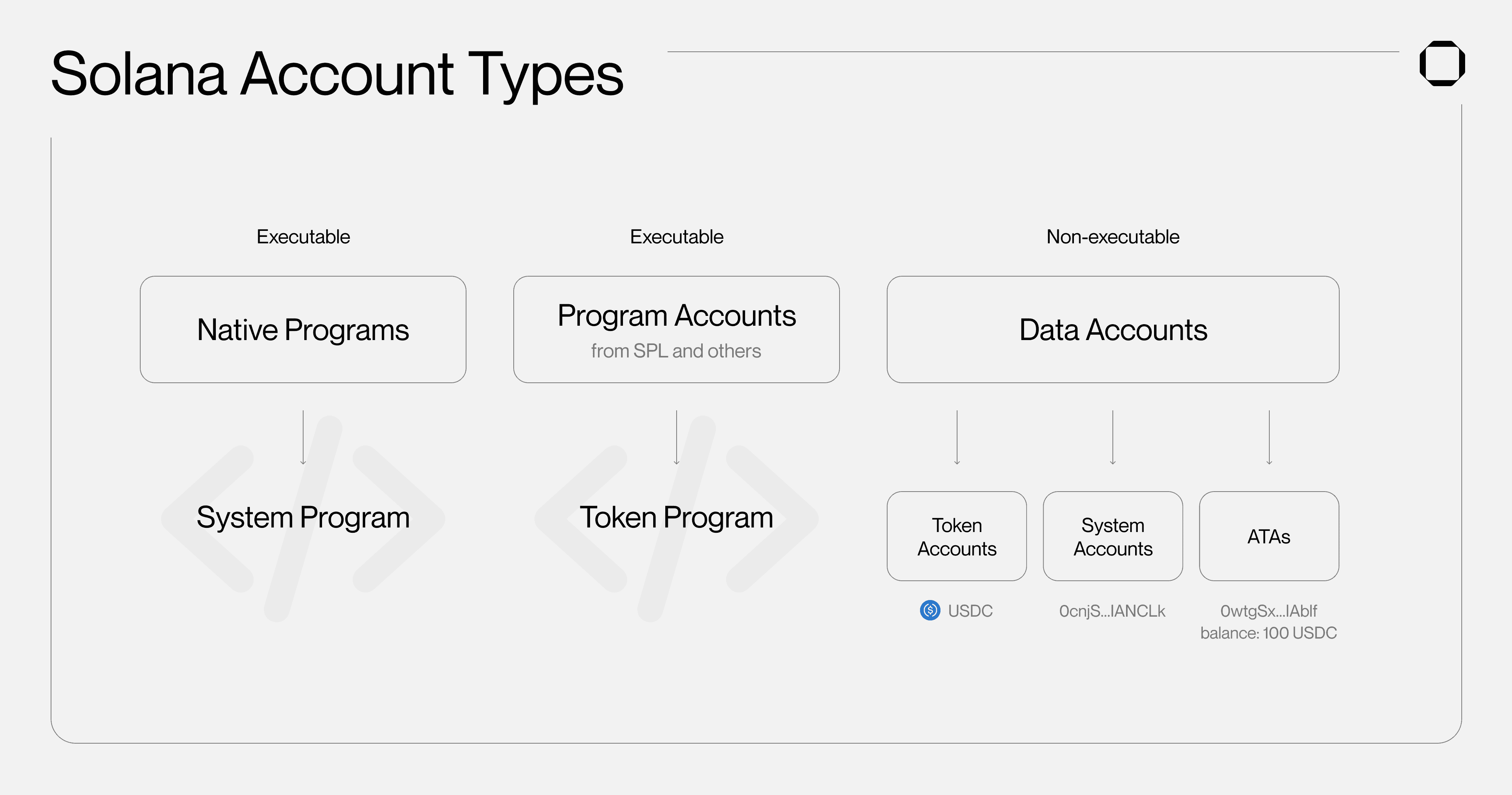
Everything on Solana is an account. Programs, user data, tokens, even the ledger state, all stored in accounts. There’s no database engine, no relational tables. Just accounts in a flat key-value map where each key is a 32-byte address and each value is an account.
Every account on Solana carries these fields:
| Field | What it holds |
|---|---|
lamports | The account’s balance in lamports (1 SOL = 1 billion lamports) |
data | A raw byte array. This is where your actual data lives |
owner | The program ID that controls this account |
executable | true if this account holds runnable program code |
rent_epoch | Legacy field. Tracks rent state (more below) |
If you’ve done Ethereum development, here’s the big difference: Solana separates code from data. A program account holds executable bytecode (like a contract). A data account holds state that the program reads and writes. They’re different accounts.
Why does this matter? Because when transactions touch different data accounts, the runtime can process them in parallel. No single global state bottleneck.
2. Who Owns What
Every account has an owner (a program ID). The Solana runtime enforces a simple set of rules about who can touch what:
- Only the owner program can change an account’s
data - Only the owner program can deduct lamports from the account
- Any program can credit lamports to any writable account
- The owner is the only program that can reassign ownership to another program (and only if the account is not executable)
- No two programs can borrow the same account for writing at the same time
When you create an account, the System Program (11111111111111111111111111111111) owns it. To hand it off to your program, the System Program transfers ownership. Once your program owns it, only your program can write to it.
Account lifecycle:
1. System Program creates the account → owner = System Program
2. System Program assigns ownership to your program
3. Your program is now the only thing that can touch this account's data
For program accounts (the ones with executable: true), the owner is the loader program, typically the BPF Loader. That’s a topic for Part 3.
3. How Storage Actually Works
Account data is just a raw byte array. There’s no schema engine, no ORM, no magic. Your program decides how to pack and unpack bytes.
Borsh: The Go-To Serializer
Most Solana programs use Borsh, a compact, deterministic binary serialization format. A typical data struct:
Size calculation matters because you need to allocate bytes upfront:
UserProfile = 32 (Pubkey) + (4 + max_username_len) + 8 + 1
If you’re using Anchor, add 8 bytes for the discriminator it prepends automatically.
Sizing Rules
Maximum account data size is 10 MB. You allocate space at creation time and can’t grow it later. Closing and recreating is the only way to resize. My advice: always over-allocate. Adding a few extra bytes now is cheaper than migrating data later.
Layout Tip
Put fixed-size fields first, variable-size fields (strings, vecs) last. This keeps everything at predictable offsets:
+-------------------+
| 8 bytes: Anchor   |  <- Anchor discriminator (if using Anchor)
|   discriminator   |
+-------------------+
| Fixed-size fields |  <- Pubkeys, u64s, bools, always at known offsets
+-------------------+
| Variable-size     |  <- Strings, Vecs, keep at the end
|   fields          |
+-------------------+
4. Rent: Paying for Storage
Storing data on Solana costs SOL. The network calls this rent, but it works more like a deposit. You get the full balance back when you close the account.
Here’s the deal: every account must hold a minimum lamport balance proportional to its data size. This balance keeps the data alive on-chain.
Rent-Exempt: The Normal State
The practical approach is simple: fund every account with enough lamports to cover two years of rent upfront. Once you do that, the account is rent-exempt. The runtime never deducts anything from it.
This isn’t optional in practice. Every account you create needs to be rent-exempt from day one.
| |
The rent_epoch field you see in account structures? It’s a legacy from when rent was actually deducted per epoch. In practice, every new account must be funded to the rent-exempt minimum at creation. The runtime won’t let you create an underfunded account.
Closing Accounts
When you don’t need an account anymore, your program can close it to reclaim the SOL:
| |
The account still exists at its address, but with zero balance and empty data. Garbage collection takes care of the rest.
5. Program Derived Addresses (PDAs)
PDAs let programs own and manage accounts without any private key. This is probably the part of Solana that trips people up the most, so let’s take it slow.
What Makes a PDA Different
Normal Solana addresses are public keys from Ed25519 keypairs. They have a corresponding private key that signs transactions. A PDA is different: it’s an address that’s intentionally derived to fall off the Ed25519 curve. No private key exists for it. Ever.
Think of it like this: a PDA is a mailbox address that only one specific program has the key to open. No human, no other program, can sign for it.
You derive a PDA from two things:
- A program ID: which program “owns” this address
- Seeds: arbitrary byte strings you pick (like
b"profile"or a user’s public key)
The derivation process tries bump values starting from 255, counting down, until it finds an address that’s off the Ed25519 curve. That final bump byte is what it returns alongside the address.
Important: deriving a PDA is just math. It doesn’t create anything on-chain. As the Solana docs put it, a PDA is like an address on a map. Just because the address exists doesn’t mean there’s anything built there. You still need to explicitly create the account.
Why PDAs Are Useful
Predictable addresses. Same seeds + same program = same address, every time. Your frontend can compute where an account lives without asking the chain.
Program-only control. Only the owning program can sign for its PDAs via invoke_signed. No external key can interfere. This is what makes PDAs safe. No human, no other program, can hijack them.
Flexible state design. Different seed combinations give you different addresses. One account per user? Seeds [b"profile", user_pubkey]. A global config? Seeds [b"config"]. Map your state however you want.
Common Seed Patterns
Signing with a PDA
When your program needs to sign a transaction on behalf of a PDA (for example, transferring SOL out of it), you use invoke_signed:
| |
The runtime re-derives the address from the seeds and program ID. If it matches the account being acted on, the signature is valid. This is the only way a PDA can sign. There is no private key fallback.
6. Tying It All Together
Put it all in motion. A user submits a transaction. The runtime loads every account listed in the instruction. Your program checks the owner field: does it actually own these data accounts? If yes, it reads and writes the raw bytes (Borsh-serialized).
Every account involved needs its lamport balance at or above the rent-exempt minimum. If PDAs are part of the flow, your program signs with invoke_signed using the seeds. The runtime double-checks all ownership and signing rules. No exceptions.
Accounts, storage, rent, and PDAs. Nail these four, and the rest of Solana development gets a lot more straightforward. Part 2 covers compute units: how Solana measures and limits the work your transactions can do.